The commercebuild platform will be upgraded to 5.150 in our Australia region on October 20 at 20:00 UTC, October 21 at 06:00 Melbourne time.
5.150 will be released to our North America and Europe regions October 27 at 19:00 Eastern time, October 28 at 00:00 UTC.
Web stores that were affected by any issues fixed in 5.150 will be updated in the corresponding tickets/conversations.
This is a list of issues that are to be resolved:
- Shipping method description incorrect for offline Sage orders
- Orders created in Sage could show the wrong shipping method on the web store order page. The page used the first carrier with a matching code when the order had no web store shipping record.
- Affects: Core web stores (v4) on Sage.
- Intercom: 215471760661417
- Internal: PDECOM-6526
- Shipping Not Sent to Sage When Using Promo Code
- A promo that offers free shipping over a minimum could leave shipping off the order sent to Sage, even when the cart was under that minimum and the web store charged it.
- Affects: Core web stores (v4) on Sage that use a promo of that kind.
- Intercom: 161933000068053, 215475989789047, 215476044267032, 215476282401502
- Internal: PDECOM-6523
- Custom Email Template - Quote - Not Working
- A custom quote email could be enabled in store admin and still not be sent. The customer received the order confirmation email instead.
- Affects: Core web stores (v4) with a custom quote email template.
- Intercom: 215476153687393
- Internal: PDECOM-6522
- Gateway admin pages answer 400 on submit when the page was opened with ?access_token= in the URL
- Saving a gateway admin page failed with a blank error when the address already included an access token.
- Affects: gateway screens that send orders and payments to the ERP, on Core web stores (v4) for Sage 300, Sage X3, and Business Central.
- Intercom: 215476288014312
- Internal: PDECOM-6521
- Password blacklist follow-ups: localized messages, double-submit on v4 reset, outdated 6-character hint
- On Composer web stores (v5), the message for a too-common password stayed in English on sign-up, on checkout account creation, and in the store admin user screens. On Core web stores (v4), a second click during password reset could say the link had expired after the password had already changed, and the hint could still say 6 characters when the store requires more.
- Affects: Composer web stores (v5) and Core web stores (v4).
- Intercom: 215476252225638
- Internal: PDECOM-6474
- storephp reset flow: false "Password reset complete" and wrong token in B2B user emails
- A new password that did not meet the store's rules could still show "Password reset complete", and the password did not change. Emails for new and updated B2B users could include a reset link that opened "User Not Found".
- Affects: Core web stores (v4).
- Intercom: 215476061737533, 215476062877901
- Internal: PDECOM-6459
- Sage X3 pricing engine - evaluate price lists per search group and apply the most favourable net price
- The web store was combining a price from one Sage X3 price search group with a discount from another, so the price could come out lower than Sage Price Search. Each group is now priced on its own, and the lowest net price is used. Prices can go up on stores that use more than one search group. Stores with every price list in a single group stay the same.
- Affects: Sage X3 stores, on both Core web stores (v4) and Composer web stores (v5).
- Intercom: 215475967016620
- Internal: PDECOM-6416
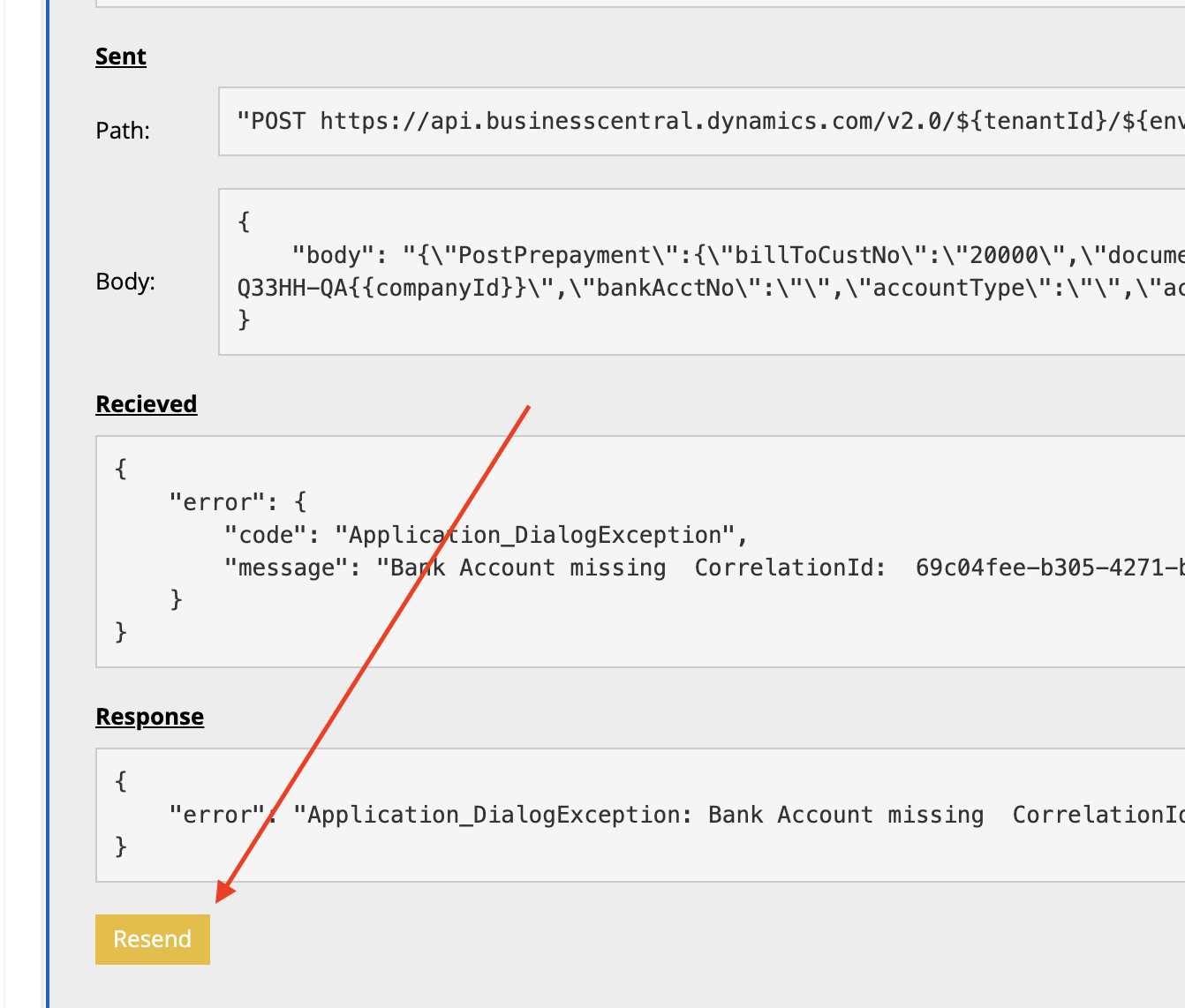
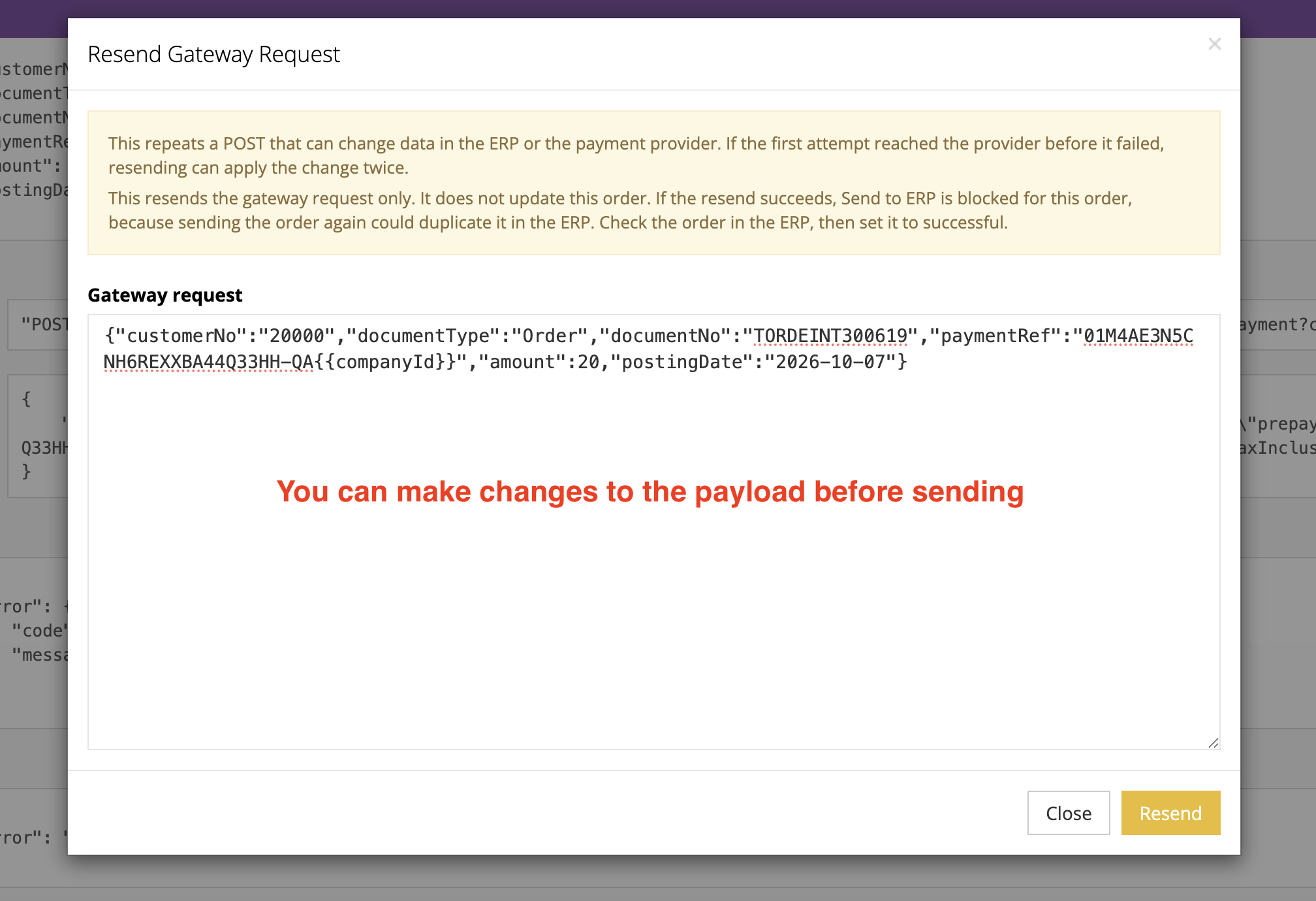
- Ability to edit/resend API payloads from store admin
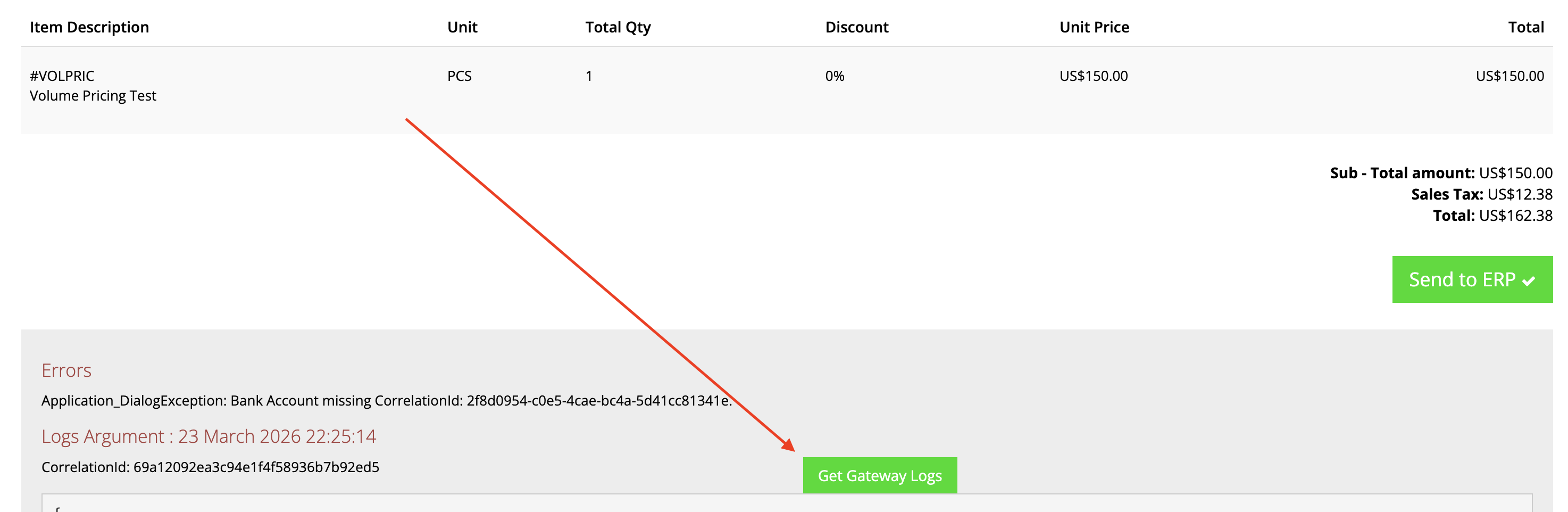
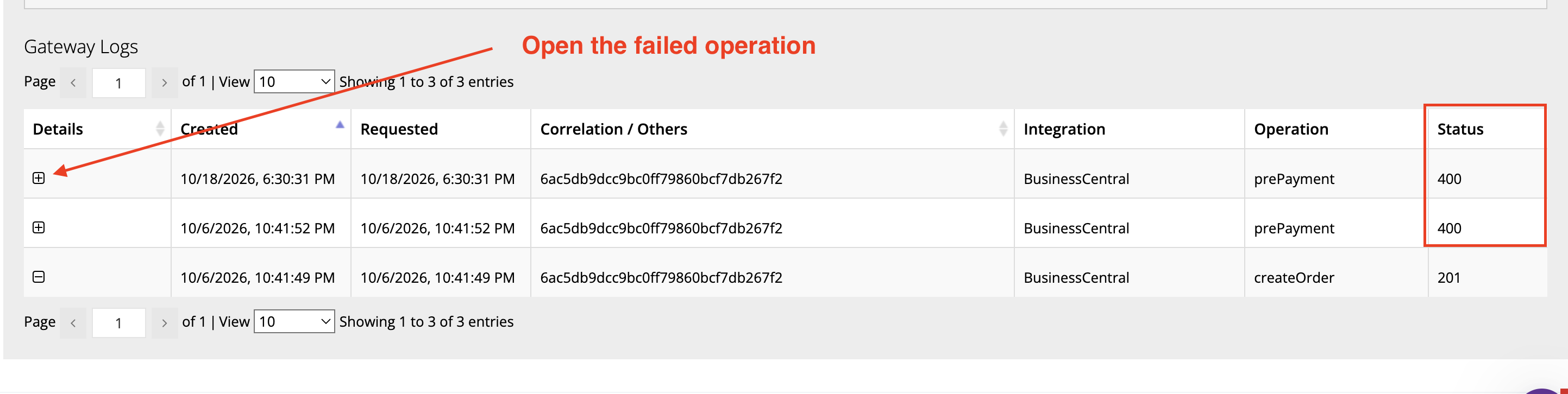
- Master admins and site administrators can edit a failed order payload and send it again from store admin.
- Affects: Core web stores (v4) that send orders to Sage 300, Sage X3, or Business Central through the API gateway.
- Intercom: 215475885097702
- Internal: PDECOM-6415
- Add Global Payments auth code to createOrder and setInvoicePayment V2 payloads
- The Global Payments authorization code is now included on the Sage X3 sales order and on the payment receipt, so the payment can be matched in Sage.
- Affects: Sage X3 stores that take payment with Global Payments.
- Intercom: 215475966996316
- Internal: PDECOM-6372
- Support for Robots.txt and Meta Tag support
- Composer web stores (v5) can edit robots.txt in admin, and can add site-wide head tags such as a search-engine verification meta tag. The robots.txt field on a Core web store (v4) does not apply to a Composer web store (v5). A setting to mark a single page as noindex is not in this release.
- Affects: Composer web stores (v5).
- Intercom: 215476258093347
- Internal: UN-3457
- Saved credit card management
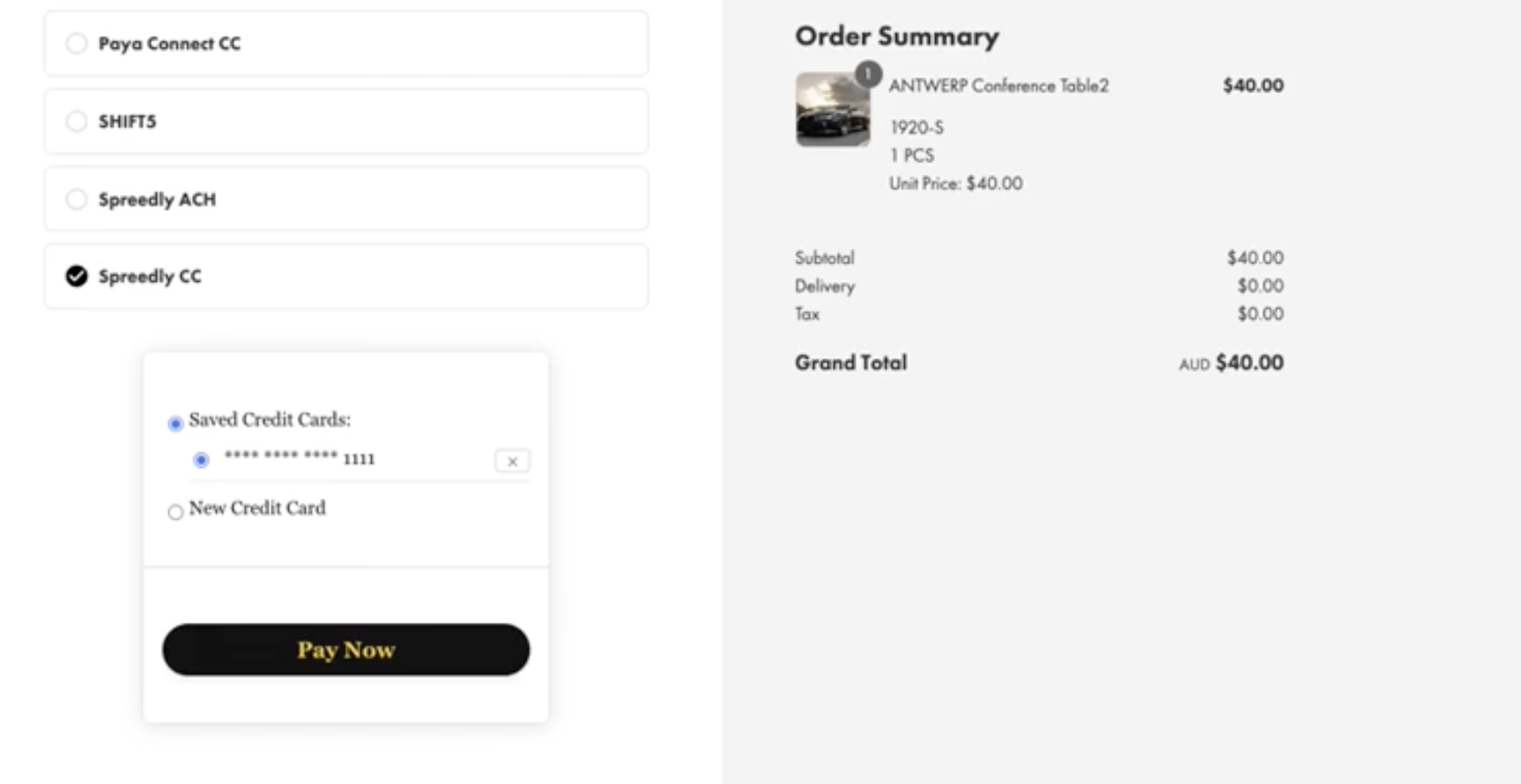
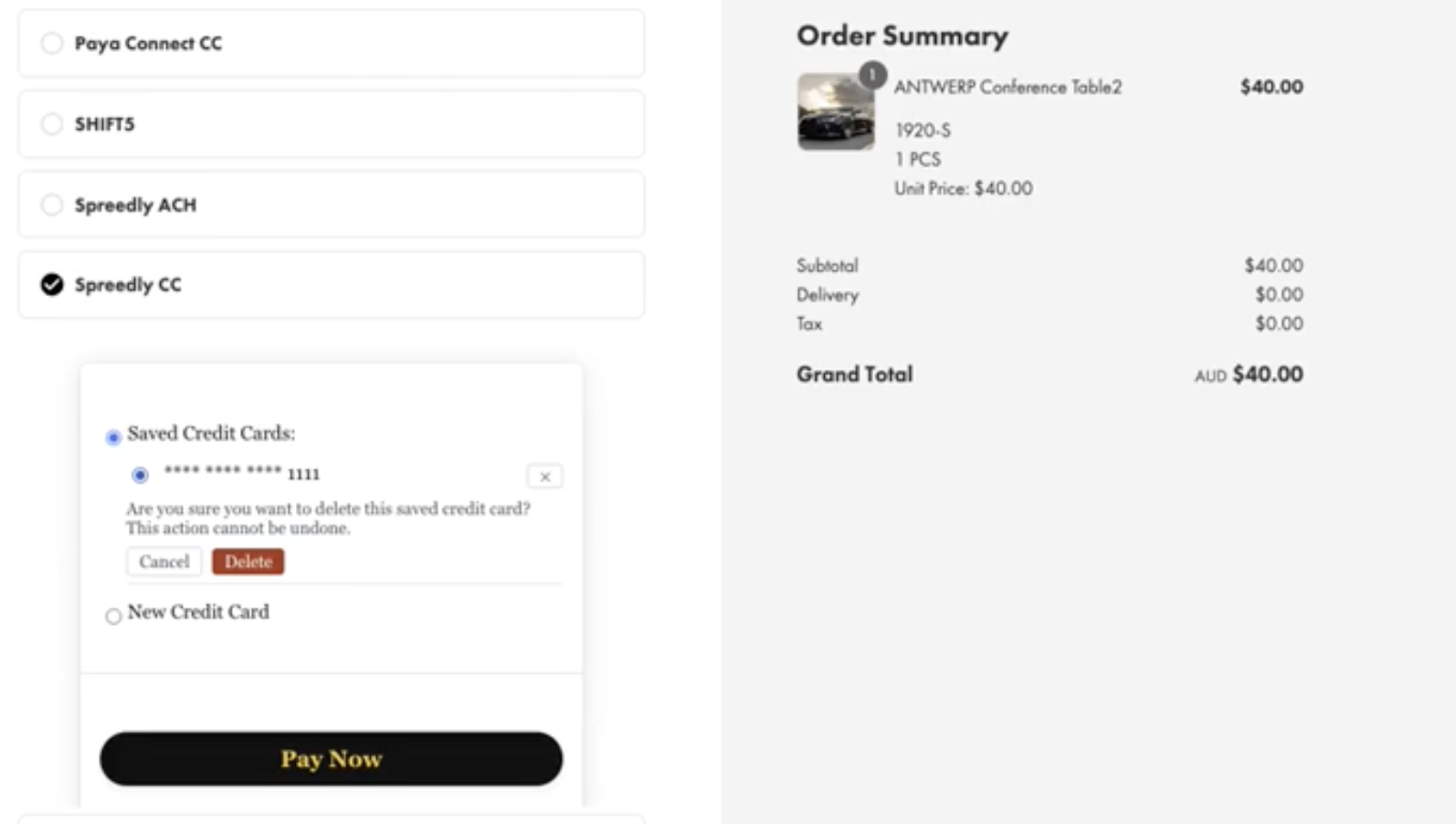
- At checkout, you can delete a saved credit card. Expired cards are marked EXPIRED, shown greyed out, and cannot be selected. They can still be deleted.
- Affects: the V2 checkout, for stores that save cards with Spreedly, Braintree, Fortis, Westpac PayWay, or Paya Connect.
- Internal: PDECOM-4924
New Features
Ability to edit/resend API payloads from store admin
This affects web stores that are using our API Gateway. If an order or operation fails to post to the ERP server, you now have the ability to modify the payload that is sent, and then resend it from the store admin.
Saved credit card management
This affects web stores that are using the v2 checkout with Spreedly, Braintree, Fortis, Westpac PayWay, or Paya Connect. At checkout, you can delete a saved credit card. Expired cards are marked EXPIRED, shown greyed out, and cannot be selected. They can still be deleted.