
Overview
Sometimes you may need to export all orders placed by a specific customer. This can be done quickly from your webstore’s admin by filtering orders by the customer’s email address and then exporting them.
How do I do it?
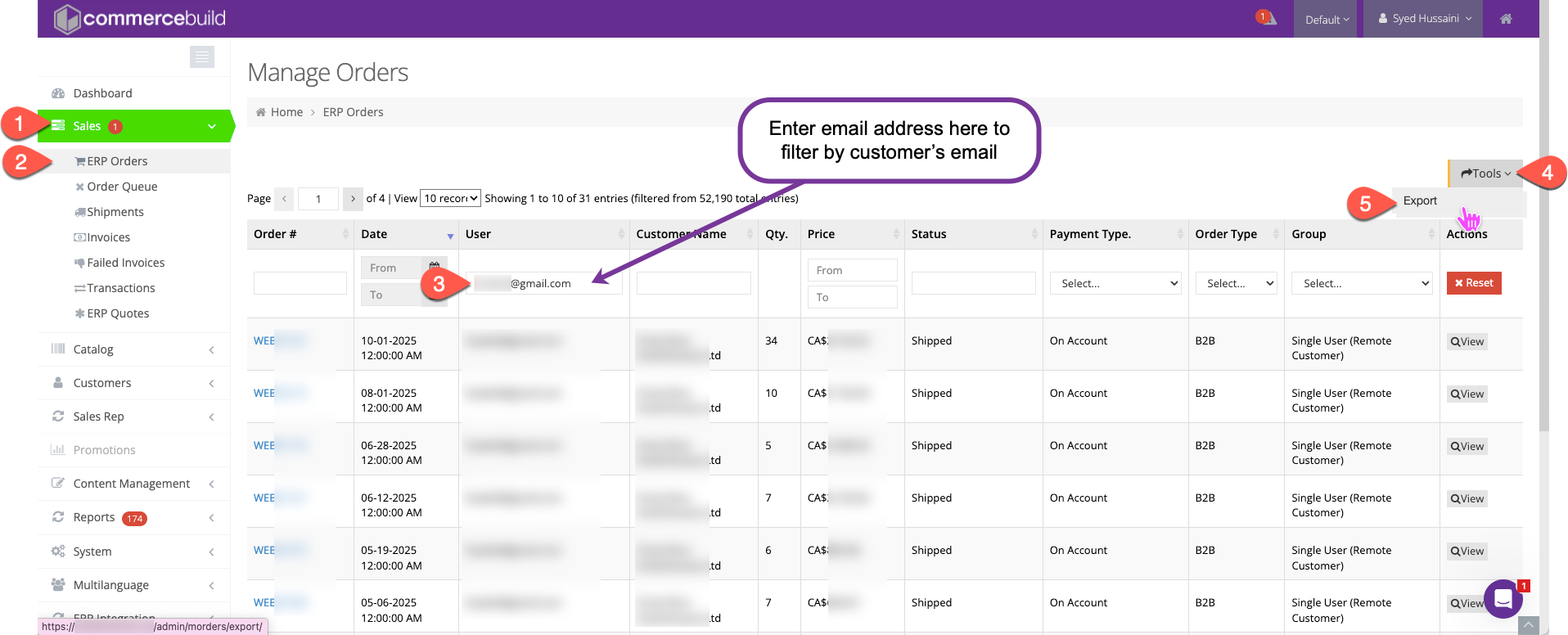
- Log in to your webstore admin > Go to: https://YourWebStore.com/admin/morders/orders
- Filter by user
- Locate the User column.
- Enter the customer’s email address in the filter field.
- Apply the filter to display only that user’s orders.
- Export the results
- After filtering, click the Export button (typically at the top-right of the orders list).
- Download the file in your preferred format (CSV or Excel).
Conclusion
By filtering orders by the customer’s email and using the export option, you can easily generate a report of all orders for any specific user. If you need additional details or exports across multiple users, reach out to your support team for further help.