
Overview
In commercebuild, your Dealer (B2B) and Public (B2C) content live within the same webstore, but they can have different views and content.
If you’ve created or updated a Brand, Category, Default Page, or Custom Page in the Dealer (B2B) view and want that same content reflected in the Public (B2C) view, you can copy it over directly.
You have two options depending on what you need to copy.
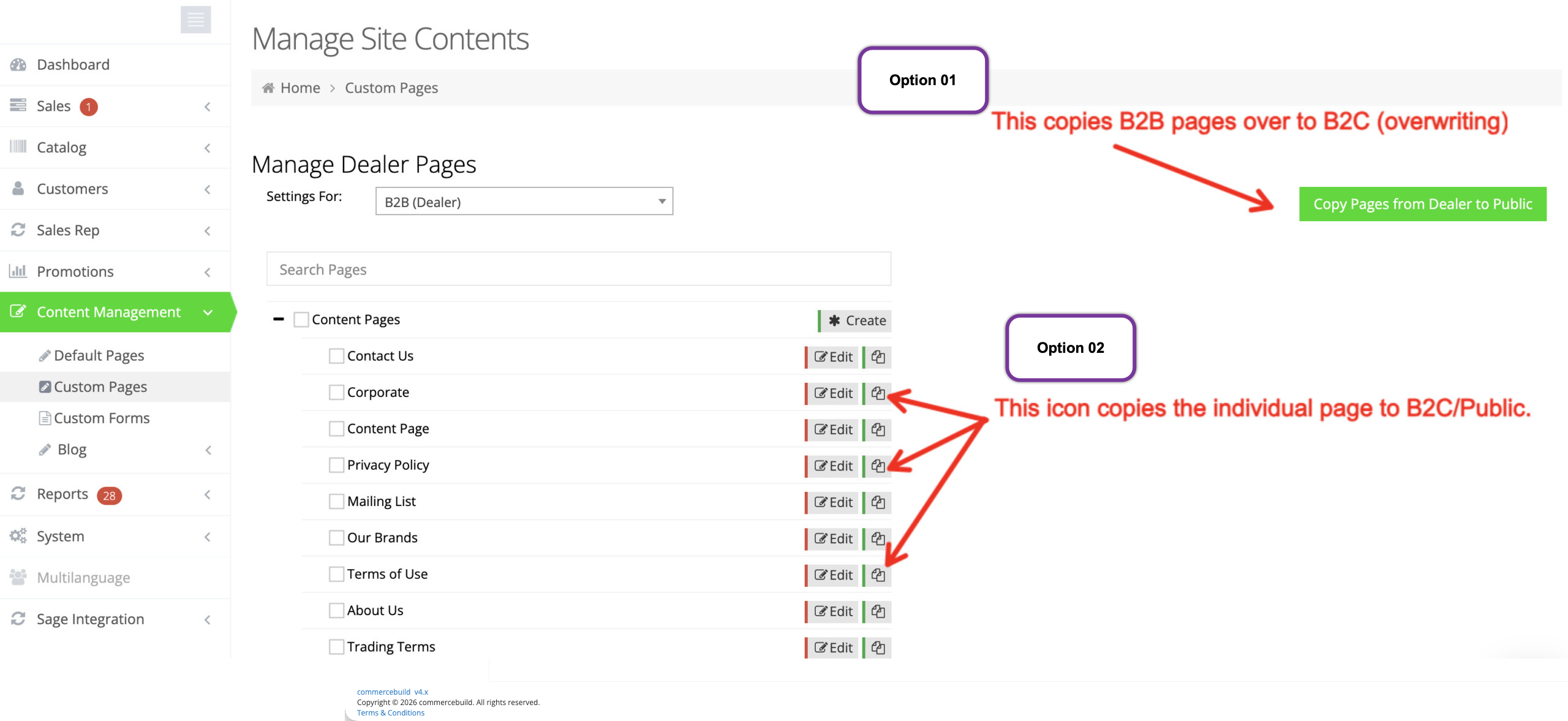
Option 01: Copy from Dealer to Public (Bulk Copy)
This option copies all B2B content of that type into the Public (B2C) view in one action.
⚠️ Important: This will completely replace the existing B2C content for that section. Any current Public content will be overwritten.
Option 02: Use the “Copy” Button (Single Page Copy)
This option allows you to copy one specific Brand, Category, or Page from the Dealer (B2B) view to the Public (B2C) view.
⚠️ Just like the bulk option, this will fully overwrite that specific B2C page.
Best Practice Before Copying
Since both options overwrite Public (B2C) content, always review the existing page first. Make sure you’re not replacing content that is intentionally different between Dealer and Public views.
Use it thoughtfully, and you’ll keep your B2B and B2C content clean and aligned without confusion.