
Overview
Note: The category depth limit is a platform setting managed by commercebuild Customer Success. If you need the depth adjusted (e.g., from 3 levels to 5), please contact your Customer Success. There is no additional charge for this change.
Categories Depth Limit controls how many nested category levels the store will use in admin and on the storefront mega menu.
Default: 3
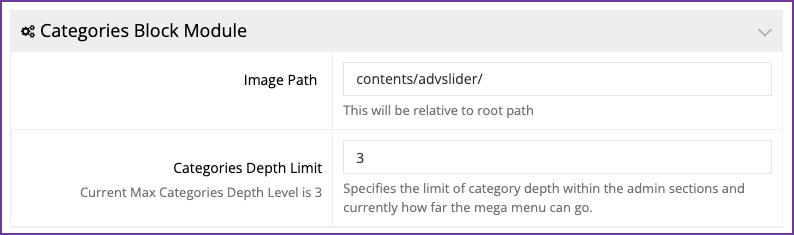
That default is why many stores (and older docs) talk about a “3-level category tree.” It is a starting value, not a platform maximum. Stores that need a deeper catalog commonly set this to 5.
Example with a limit of 3:
- Shop
- Shop → Power Tools
- Shop → Power Tools → Drills
At that last level, admin hides Add Subcategory, and the mega menu stops nesting further.
With a limit of 5, the same store can go two levels deeper (for example: Shop → Power Tools → Drills → Cordless → 18V).
This setting does not create categories. It only decides how far the tree can be managed and displayed. The Image Path field in the same module is unrelated.
How it works
- Set Categories Depth Limit to the number of levels required (for example
3or5).
That number is then used in two places:
Admin (Catalog → Categories)
- Nested categories can be opened and managed down to the limit.
- Add Subcategory is shown until the last allowed level, then hidden.
- User-group category access trees follow the same limit.
Storefront
- The category mega menu / responsive menu only renders nested items down to this depth.
- Category URLs, breadcrumbs, and related category listings also walk the tree using this value.
If you raise it (3 → 5)
Deeper categories can be added in admin, and existing deeper categories that were previously past the limit can appear in the menu.
If you lower it (5 → 3)
Categories already in the database are not deleted. Admin will stop offering Add Subcategory at the new max, and the mega menu will not show levels beyond it. Very deep content URLs can also stop resolving and throw 404 errors.
Related setting: Page Level Limit (Routes) sits nearby and applies to content pages, not product categories. Change it only if content pages also need more nesting.
After changing the value, refresh the storefront (and clear cache if the menu still looks stale).
Conclusion
Use Categories Depth Limit when a catalog needs more (or fewer) nested levels than the default of 3.
- 3 is the default and is enough for most stores.
- 5 is supported and is the usual choice when a client needs a deeper tree.
- The number on the settings screen is the current limit, not a fixed maximum of 3.
Match the value to the real category structure. A higher number allows deeper menus; it does not by itself add categories.