
There are two ways to prevent a promo code from being used by your customers.
Delete the Promo Code
The promo code can be fully deleted from the system. That said, please note that this will also delete it from the promotions Reports section (Promotions > Reports).

Make the Promo Code Inactive
Expiring a promo code is better than deleting it as it allows you to preserve any records found in Reports.
When creating a promo code, it’s best to create it without an expiry. As promo codes cannot be modified once they’re expired, this allows you to set the expiry date when you’re absolutely sure you want the promo code to no longer be usable.
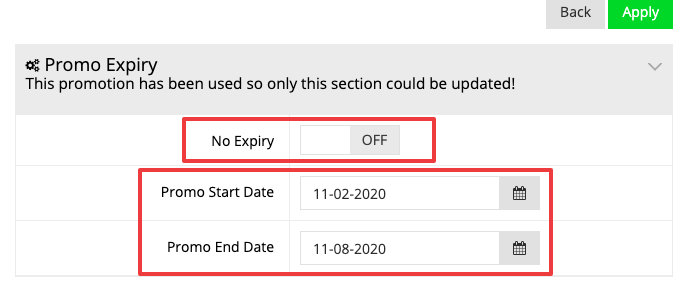
To achieve this, follow these steps:
- Go to Promotions > Promo
- Locate the promo code(s) that you want to deactivate/expire.
- Click the “edit” button corresponding to the promo code in the table.
- Turn off “No Expiry” and set the “Promo Start Date” for any date in the past, as well as the “Promo End Date” for any date in the past.
- Click “Apply”. Customers will now be unable to use the promo code.