
This article explains the difference between linking to another A/R customer and assuming another user account on the web store.
When a user has permissions to switch to different user accounts, they will be able to open a popup window that looks similar to the following. From there, they can either link to another user, or assume another user's account.
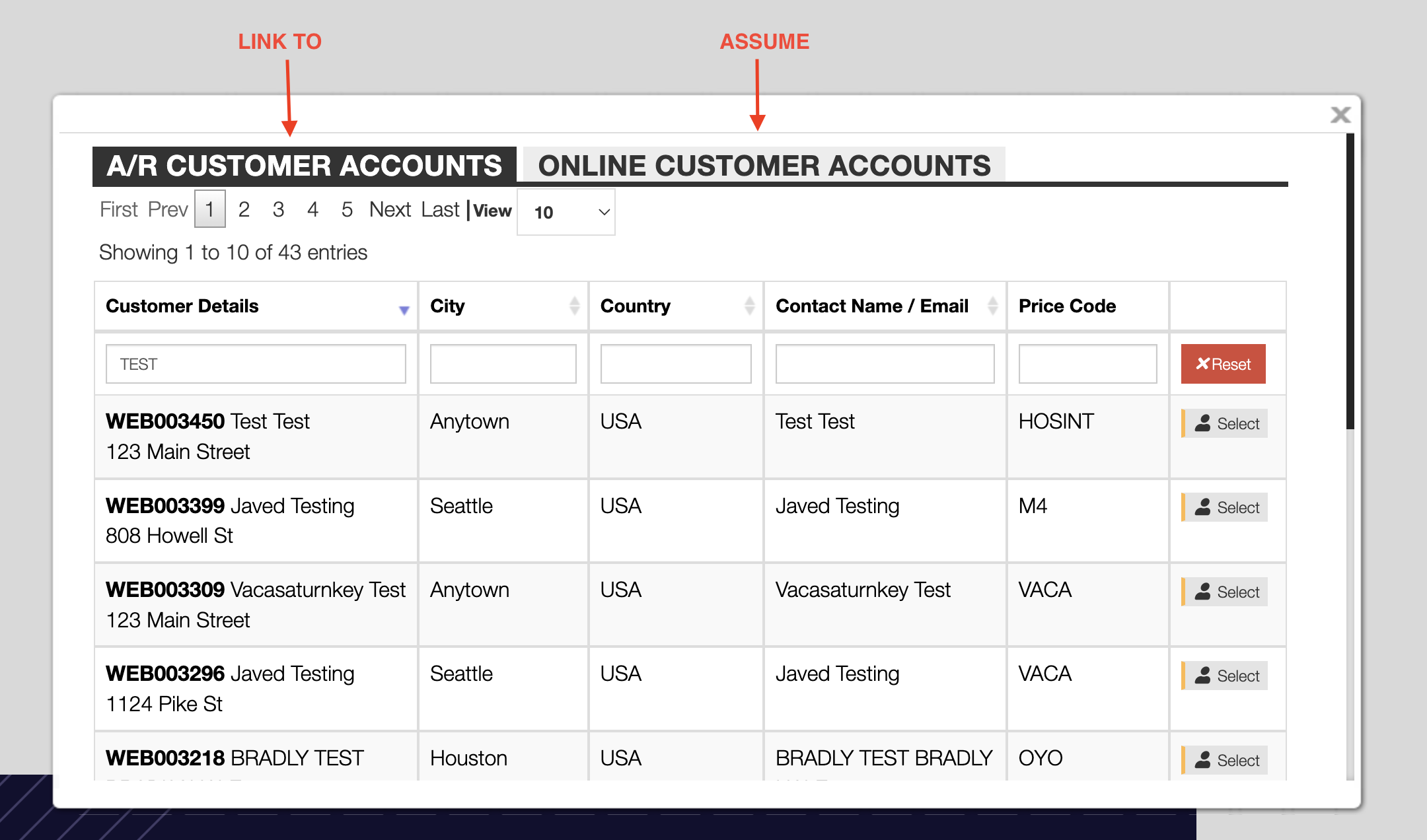
In essense, when you link to another account, you are still browsing the website as yourself but viewing things like pricing from the A/R customer's perspective.
When you assume another account, you essentially step into the store as that user. Nearly all aspects of the shopping experience are done through that user's account.
Linking (to a different A/R customer)
What it is: You stay logged in as the same web user, but you can use a different A/R (Accounts Receivable) customer for the order—for example, a different bill-to or ship-to customer code.
Your session: You are still you. Your user account (login) does not change.
What you see:
- Your same saved payment methods (saved cards are tied to your user account, not to the A/R customer).
- Your same order history and account settings.
- Addresses, pricing, or terms that apply to the linked A/R customer when you place an order.
Typical use: Ordering on behalf of another customer (e.g. a different company or location) while staying in your own account.
Confirmation Emails: are sent to your email address.
Restriction on who can be linked: The list of A/R customers that can be linked to can be set in the user's settings.
Assuming (another user account)
What it is: An admin or authorized user logs in as or assumes another user's account. The system treats the session as that other user.
Your session: You are effectively that user. The session uses their user ID and permissions.
What you see:
- That account's saved payment methods, not yours.
- That account's order history, addresses, and preferences.
- Pricing, terms, and visibility that apply to that user.
Typical use: Support or admin helping a customer by acting in their account, or testing as another user.
Confirmation Emails: are sent to the other user account's email address.
No restriction on who can be assumed: A user group that has access to assume other users can assume any non-admin user. This access should be restricted to support or admin users who need to be able to act on behalf of any user for troubleshooting or administrative tasks.
Comparison
| Linking to another A/R customer | Assuming another user | |
|---|---|---|
| Who you are | Same web user (you) | Other user (their account) |
| Saved cards | Your saved cards | Their saved cards |
| Order history | Your orders | Their orders |
| Customer code used | Different A/R customer (e.g. bill-to) | That user's customer/account |
Summary
- Linking = same login, different A/R customer for the transaction (e.g. bill/ship to another customer).
- Assuming = acting as another user's account (different login/session); you see their data, including their saved cards.