
Overview
Sales Rep accounts in commercebuild are designed to mirror the customer–salesperson relationships defined in your ERP (Sage). Each Sales Rep user in your webstore can be linked to one Sage Salesperson, and that linkage controls:
- Which customers the Sales Rep can See when they log in
- Which orders they can place on behalf of customers
- What analytics and order history are available to them
Because this connection is dynamic, any customer assigned to that salesperson in Sage will automatically appear under the Sales Rep’s allowed customer list in the webstore.
If you ever need to switch a Sales Rep user to a different salesperson, you can update that directly from the Commercebuild admin.
Key Notes Before You Begin
- A Sage A/R customer must be assigned a Sales Rep code in Sage first.
- The Sales Rep user in Commercebuild then links to that same Sage Salesperson.
- “Allow all customers” should remain disabled for Sales Rep accounts.
- Ideally that’s not needed and shouldn’t be selected (as it defeats the purpose of having salesperson account) because salesperson accounts should be able to only see the customers they are linked with and not all customers.
- Each Sales Rep user can be linked to only one Salesperson.
- If you have multiple sales regions or multiple salespeople handling different customer sets, you’ll need to create separate Sales Rep logins — one for each salesperson.
How to Change the Linked Salesperson
Follow these steps to update the salesperson assigned to a Sales Rep user:
- Go to Admin → Sales Rep → Manage Sales Rep
- Find the Sales Rep you want to update and click Edit
- Under Salesperson, click the selector to choose the Sage salesperson you want to link
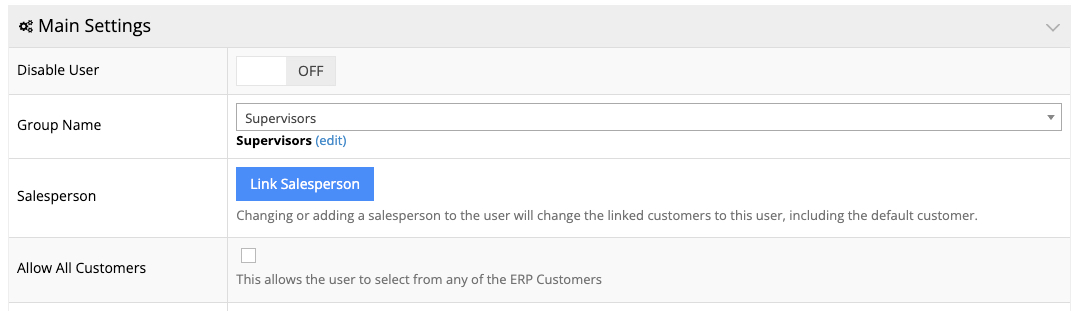
- Click on Apply to save your changes
Once saved, the list of customers available to that Sales Rep will automatically refresh based on the customers assigned to that salesperson in Sage.
What Happens After Changing the Linked Salesperson?
- The Sales Rep will immediately See the new set of customers assigned to the new salesperson
- The previous customer list will be removed
- The default customer for that user will also update
- No changes are made inside Sage itself, this only affects the webstore linkage
Multiple Salespersons (Common Question)
commercebuild supports one salesperson per Sales Rep login.
If your sales process requires a single rep to handle multiple regions or multiple salesperson codes in Sage, you’ll need to create:
-
One Sales Rep user per Sage salesperson
This ensures that each Sales Rep user continues to See the correct customer list based on their assigned salesperson.